
Testimonial-Slider-Funktionen
Entdecken Sie alle Funktionen des Elfsight Testimonial-Schieberegler und wie sie Ihnen helfen können, das effektivste Widget zu erstellen.
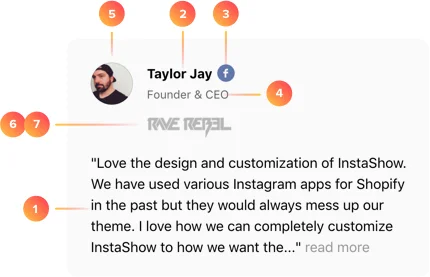
Author data:
- Testimonials text
- Author’s name
- Social profile URL (Facebook, Twitter)
- Author’s position, company name
- Picture
- Website url
- Company logo
Total trust with social profile URL
Don’t stop at showing only text – add author’s Facebook or Twitter account URL, to prove this person is real. An icon near the author’s name will link to his or her profile. Your visitors will be able to follow the link by clicking the icon and make sure that they deal with a testimonial written by a real individual – achieve 100% trust!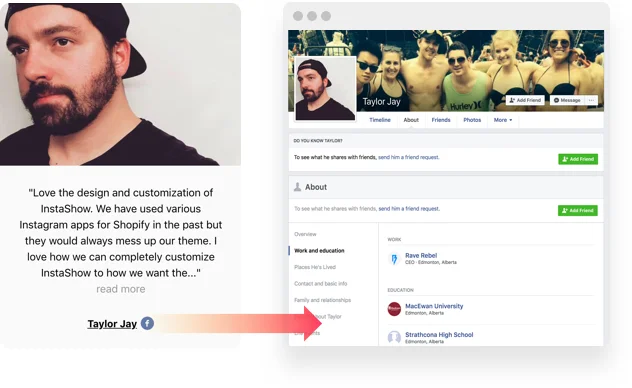
Brands will add weight to your image
If you have a testimonials left by some brand or would like to mention the company of one of the authors – you can make it your benefit and boast it on your website. Just add the company’s logo and provide a link to the website. The more profile information you demonstrate – the better.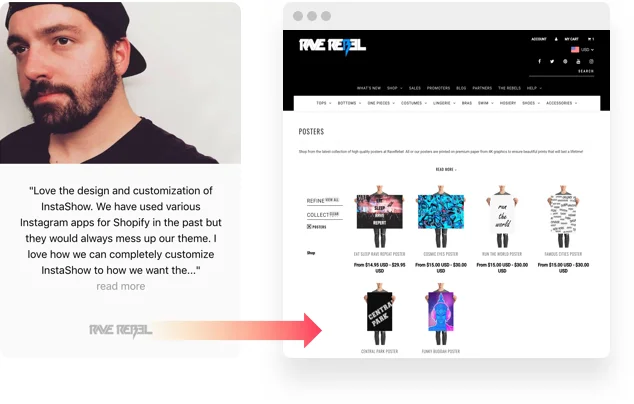
Kundenstimmen
Beispiele zur Nutzung
Fügen Sie eine Absende-Schaltfläche hinzu. Verwenden Sie eine stilisierte Schaltfläche mit type=”submit,
In Aktion sehen
Live-Demo
Testen Sie jetzt alle Funktionen des Testimonials Slider im Live-Demo. Keine Gebühren. Keine Registrierung. Kein Programmieren nötig.
Jetzt ausprobieren
Slider layout
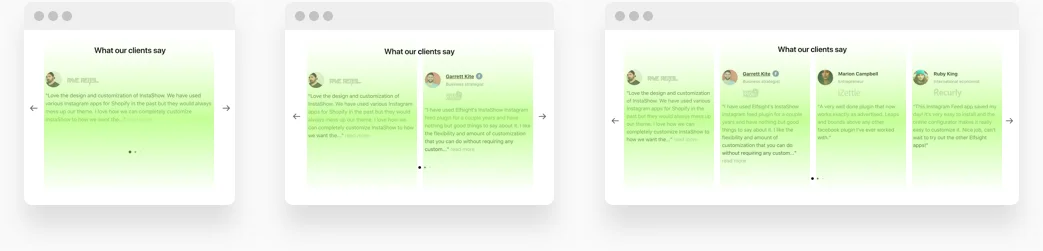
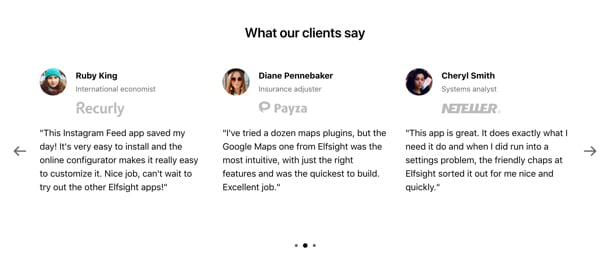
This layout is for displaying testimonials carousel on your page. It’s the right choice if you need your testimonials to be a part of some page of your website, for example, the Product page. The slider layout supports arrows, touch moves and pagination to view the testimonials, navigation will work perfectly on any device.
Tip: Apply slider layout if you plan to display your testimonials as a part of some webpage, for example, home page or product page.
Grid layout
We have an option for those who would like to devote a whole page to the testimonials, too! Grid layout will manage this task perfectly, it allows testimonials to fill all the content area and look really impressive. This is also an illustrative way to represent a single detailed testimonial. And yes, it will perfectly fit any website design.
Tip: Set grid layout if you have a dedicated page, filled with customer testimonials on your website.

Slider layout
This layout is for displaying testimonials carousel on your page. It’s the right choice if you need your testimonials to be a part of some page of your website, for example, the Product page. The slider layout supports arrows, touch moves and pagination to view the testimonials, navigation will work perfectly on any device.
Tip: Apply slider layout if you plan to display your testimonials as a part of some webpage, for example, home page or product page.
Grid layout
We have an option for those who would like to devote a whole page to the testimonials, too! Grid layout will manage this task perfectly, it allows testimonials to fill all the content area and look really impressive. This is also an illustrative way to represent a single detailed testimonial. And yes, it will perfectly fit any website design.
Tip: Set grid layout if you have a dedicated page, filled with customer testimonials on your website.
Slider layout
This layout is for displaying testimonials carousel on your page. It’s the right choice if you need your testimonials to be a part of some page of your website, for example, the Product page. The slider layout supports arrows, touch moves and pagination to view the testimonials, navigation will work perfectly on any device.
Tip: Apply slider layout if you plan to display your testimonials as a part of some webpage, for example, home page or product page.
Grid layout
We have an option for those who would like to devote a whole page to the testimonials, too! Grid layout will manage this task perfectly, it allows testimonials to fill all the content area and look really impressive. This is also an illustrative way to represent a single detailed testimonial. And yes, it will perfectly fit any website design.
Tip: Set grid layout if you have a dedicated page, filled with customer testimonials on your website.
Slider layout
This layout is for displaying testimonials carousel on your page. It’s the right choice if you need your testimonials to be a part of some page of your website, for example, the Product page. The slider layout supports arrows, touch moves and pagination to view the testimonials, navigation will work perfectly on any device.
Tip: Apply slider layout if you plan to display your testimonials as a part of some webpage, for example, home page or product page.
Grid layout
We have an option for those who would like to devote a whole page to the testimonials, too! Grid layout will manage this task perfectly, it allows testimonials to fill all the content area and look really impressive. This is also an illustrative way to represent a single detailed testimonial. And yes, it will perfectly fit any website design.
Tip: Set grid layout if you have a dedicated page, filled with customer testimonials on your website.
Slider layout
This layout is for displaying testimonials carousel on your page. It’s the right choice if you need your testimonials to be a part of some page of your website, for example, the Product page. The slider layout supports arrows, touch moves and pagination to view the testimonials, navigation will work perfectly on any device.
Tip: Apply slider layout if you plan to display your testimonials as a part of some webpage, for example, home page or product page.
Grid layout
We have an option for those who would like to devote a whole page to the testimonials, too! Grid layout will manage this task perfectly, it allows testimonials to fill all the content area and look really impressive. This is also an illustrative way to represent a single detailed testimonial. And yes, it will perfectly fit any website design.
Tip: Set grid layout if you have a dedicated page, filled with customer testimonials on your website.
Slider layout
This layout is for displaying testimonials carousel on your page. It’s the right choice if you need your testimonials to be a part of some page of your website, for example, the Product page. The slider layout supports arrows, touch moves and pagination to view the testimonials, navigation will work perfectly on any device.
Tip: Apply slider layout if you plan to display your testimonials as a part of some webpage, for example, home page or product page.
Grid layout
We have an option for those who would like to devote a whole page to the testimonials, too! Grid layout will manage this task perfectly, it allows testimonials to fill all the content area and look really impressive. This is also an illustrative way to represent a single detailed testimonial. And yes, it will perfectly fit any website design.
Tip: Set grid layout if you have a dedicated page, filled with customer testimonials on your website.
Slider layout
This layout is for displaying testimonials carousel on your page. It’s the right choice if you need your testimonials to be a part of some page of your website, for example, the Product page. The slider layout supports arrows, touch moves and pagination to view the testimonials, navigation will work perfectly on any device.
Tip: Apply slider layout if you plan to display your testimonials as a part of some webpage, for example, home page or product page.
Grid layout
We have an option for those who would like to devote a whole page to the testimonials, too! Grid layout will manage this task perfectly, it allows testimonials to fill all the content area and look really impressive. This is also an illustrative way to represent a single detailed testimonial. And yes, it will perfectly fit any website design.
Tip: Set grid layout if you have a dedicated page, filled with customer testimonials on your website.
Slider layout
This layout is for displaying testimonials carousel on your page. It’s the right choice if you need your testimonials to be a part of some page of your website, for example, the Product page. The slider layout supports arrows, touch moves and pagination to view the testimonials, navigation will work perfectly on any device.
Tip: Apply slider layout if you plan to display your testimonials as a part of some webpage, for example, home page or product page.
Grid layout
We have an option for those who would like to devote a whole page to the testimonials, too! Grid layout will manage this task perfectly, it allows testimonials to fill all the content area and look really impressive. This is also an illustrative way to represent a single detailed testimonial. And yes, it will perfectly fit any website design.
Tip: Set grid layout if you have a dedicated page, filled with customer testimonials on your website.
Tip: Apply slider layout if you plan to display your testimonials as a part of some webpage, for example, home page or product page.
Layouts
3 Kachelvorlagen für kurze Kundenstimmen
Wenn Sie viele zufriedene Kunden haben, zeigen Sie doch alle Kundenstimmen. Verwenden Sie eine unserer Kachelvorlagen, um Ihre vielfältigen Kundengeschichten zu präsentieren. Wählen Sie Classic, Balloon oder Postcard – jede Vorlage wurde entworfen, um wertvolles Kundenfeedback als attraktive Testimonials zu präsentieren.
3 Einzelvorlagen für Kundengeschichten
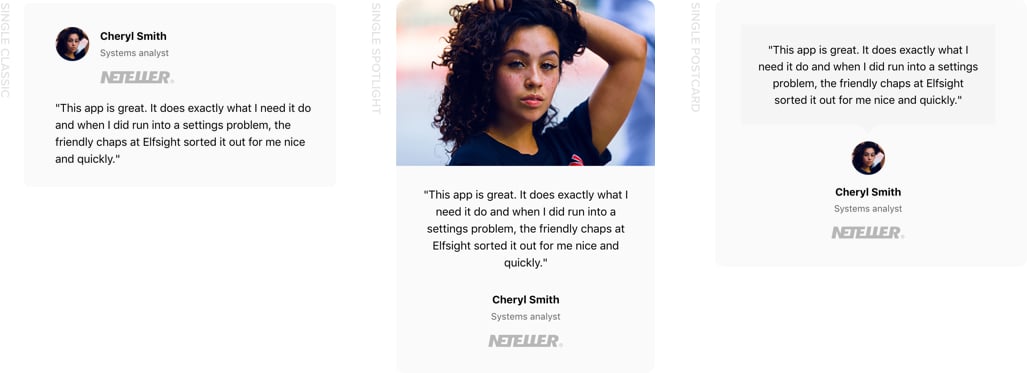
Ihre Kunden haben eine Geschichte zu erzählen? Zeigen Sie sie so, wie sie ist! Unser Testimonials-Slider-Widget ist mit einer Reihe von Einzelvorlagen ausgestattet, um Ihre Testimonials nacheinander anzuzeigen: Classic, Spotlight, Postcard. Jede Vorlage ist eine perfekte Variante, um eine Kundenerfahrung zu erzählen oder die Aufmerksamkeit der Leser auf eine der Bewertungen zu lenken.
Tip: Wenn Kundenfeedback lang und detailliert ist, kommt es mit einer der Einzelvorlagen am besten zur Geltung. Sie eignen sich besonders gut für längere Texte und helfen, die Aufmerksamkeit der Leser zu gewinnen.
Vorlagen
Schließen Sie sich 3.000.000 Kunden an, die bereits Elfsight Apps nutzen.
Probieren Sie über 90 leistungsstarke Apps von Elfsight. Keine Kreditkarte erforderlich. Die Anmeldung ist kostenlos!
Jetzt starten
Jetzt 20% Rabatt sichern!